
As a continuation of Vector RAG and Graph RAG, this article aims to demystify and explain HyDE in very simple terms.
What is HyDE?
Hypothetical Document Embedding (HyDE) is a retrieval technique used in RAG systems to improve search relevance and output. This is highly useful when the user’s queries are short, vague, or don’t match the documents’ wordings.
Why use HyDE?
The vector search works well when the user’s query is long, rich, and descriptive, or when the keywords in the user’s query match well with the stored documents.
In real life, most of the queries are short or vague. For eg:
Refund policy → this is short
Kafa integration → this is vague
This is where HyDE can make a difference. So let’s have a look at how HyDE works:
Let’s imagine the user query is
“Kafka Integration ecommerce”
How HyDE Works :
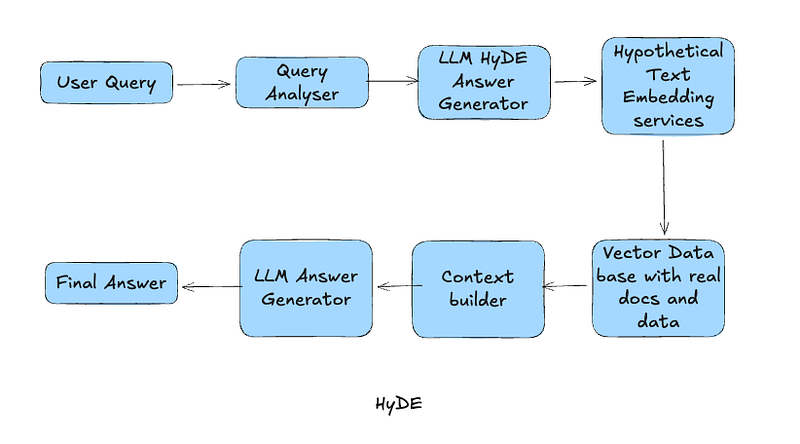
1. It will ask the LLM to write a hypothetical answer for the question.
The LLM will generate the following hypothetical text, and this text will not be shown to the user:
“To integrate Kafka with an e-commerce Order Management System (OMS), Kafka topics can be used to publish order events such as order created, order updated, order cancelled, etc. Producers in the OMS will publish events, while downstream systems like ERP, payment, or shipping systems can subscribe to these topics. This enables asynchronous event-driven integration with guaranteed message durability and scalability.”
2. Convert this generated text into vector embeddings
If you look at the above text, it is rich in relevant technical terms and content. It has more correct keywords and an almost complete summary of how it should be done.
3. Take these keywords and search in vector embeddings
Now HyDE will take keywords from the above and search in the vector embeddings and will find Kafa integration documents, Event-driven OMS documentations, ERP integrations, E-commerce integrations, etc.
This will be much better than searching directly with “Kafka Integration ecommerce.”
4. Retrieve data from real documents
Once it gets the data, it will discard the data from hypothetical documents and pass the information to LLM for final answer generation.
Where to Use HyDE?
Hyde works best when user queries are smaller and more vague, such as when building an enterprise search or knowledge base, or when your users are non-technical.
For eg, this will be highly effective in
a. Building Customer Service bots
b. Search in E-commerce platforms
c. Internal knowledge-based building and searching
d. CRM systems
At the same time, this won’t be effective to use in applications or use cases like:
a. Extracting factual information ( medical field, extracting ID’s, numbers etc)
b. When the query already has detailed information, then it’s better not to use HyDE.
c. The hallucination risk is higher with HyDE, so it has to be carefully architected
A bonus example for more clarity
User query :
“ What should I include in a product case study?”
Hyde will generate a hypothetical answer:
“A product case study should include the problem statement, personas, business objectives, solution approach, key features,KPIs, …..”
Then use these highlighted keywords and search vector embeddings and product case study templates with relevant, practical, real-life information for those keywords.
To Be Continued….


 Trooming